
The Ottoneu Auction Draft
(This is part one of the “Ottoneu 101” series)
Spring is almost here, which means pitchers and catchers (and fantasy drafts) are just around the corner. Today I’ll walk you through an Ottoneu player auction (thanks to the guys in League 100) so you can be fully prepared before your own league draft gets underway in the coming weeks.
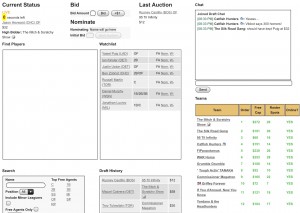
The annual auction draft is one of the highlights of the fantasy season. In addition to being a really fun night (or two), the auction is the catalyst for everything else that plays out during a given fantasy season. With your keepers finalized (1/31) and your player values beginning to take shape, the auction represents your best opportunity to handcraft a competitive roster the way you want it. And, unlike a snake-draft, the beauty of an auction-style draft (standard in Ottoneu) is that you can own any player you want…as long as you have both the budget and the willingness to pay just $1 more than everyone else.
Below you’ll find a video of the first few minutes of an Ottoneu auction so you can “see” exactly what to expect for your own draft. Some draft room highlights:
Chat (top right):
The Chat box is your standard communication tool throughout the draft, designed to help you talk some additional smack when your token Red Sox fan overbids on Rusney Castillo.
Teams (bottom right):
The Teams menu will show you who’s in (green) and out (red) of the draft room, giving commissioners the visual indication they need to “start” the auction (manually) when the room is ready. The draft order will show you the nomination (snake) order, so keep that in mind when it’s your turn to nominate a player because the auction can move quickly.
The Free Cap and Roster Spots columns are critical to monitor as you pace yourself through the auction and add players to your roster (if you switch back and forth between the draft room and your roster page, you’ll see that players you win at auction are added to your roster in real time). Your auction will effectively end when you reach either of the two limits: zero dollars left to spend, or zero roster spots left to fill. Remember, you aren’t required to exhaust either, so you can leave the auction with less than 40 roster spots filled or more than $0 dollars remaining to spend. As a very general rule, most teams will leave themselves with $10 – $20 left to spend on free agents exiting the roster, but every team is different. Cap space flexibility is important because you’ll also be picking up free agents using a 48-hour blind “auction” process during the season as well as working through potential cap penalties on players you cut.
On the very bottom right you’ll have the option to voluntarily end your own auction, which will skip your team in the nomination order. If you’ve finalized your draft but still want to watch the rest of your league finish it off, be sure to click this option to speed up the remaining nominations. Confirm with your commish, but in most leagues it is expected that you nominate a player during every one of your turns during the auction. As a reminder, you should hear a “chime” when it’s your turn to nominate (and when one of your Watchlist players is nominated).
Draft History (bottom, middle):
The Draft History will show you a running list of all drafted players throughout the auction. You’ll also see the most recently drafted player at the top of your screen, just to the left of the chat box (Last Auction).
Search (bottom left) & Find Players (left):
The Search and Find Players boxes work together, and look similar to the player search menus found in Ottoneu league pages. Searching for players here will populate the Find Players box and give you a wide range of free agent players by position or by name that fit your criteria. Be sure to check the “include minor leagues” box if you’re looking for prospects to auction. You can nominate players directly from the Find Players box.
Watchlist (middle):
Maybe one of the more useful features of the draft room, you can use the Watchlist to queue free agent players you want to nominate or just keep an eye on during the auction. This is especially helpful because the rapid speed of the auction can make it difficult to search for available players late in the draft, so you’ll want to take advantage of having them pre-loaded in your sights before you run out of time. Only free agents will be visible in the Watchlist, so if you have a player listed that is won at auction, they will automatically drop off your Watchlist in real time. You can setup your Watchlist well before (days) your auction begins, which is a best practice.
Current Status (top left):
In addition to showing you the status of the auction (“Live”, “Paused”), this menu is your key indicator of both the time remaining and current bid price of the player being auctioned. Initial player nominations begin with 30 seconds on the clock, but with each subsequent bid, the countdown clock will reset to 15 seconds. The clock will be highlighted yellow when five seconds remain, your final indicator that a player is about to be won by the current high bidder (team).
You can bid on any player by either entering a whole digit price (Ex: $10) into the bid box, or via the “+$1” option, which simply adds $1 to the current high bid on the player being auctioned. You’ll want to use the +1 button somewhat cautiously, as it’s very possible someone could throw out a $10 bid on a just-nominated $1 player and your quick +1 trigger could take him to $11, a price you’re not comfortable with.
If you are preparing for your first Ottoneu auction this spring, you are in for a treat, as there’s really nothing like it. Preparation is key, so take full advantage of all the tools and tips available here on RotoGraphs to get your draft strategy in place before your auction begins. Most first year Ottoneu auctions take about 6-8 hours to complete (half that for 2nd+ year leagues), so many new leagues will split the auction into two evenings.
If you have questions about the auction process, let us know. If you’re looking for auction strategy, check out our podcast here.
Trey is a 20+ year fantasy veteran and an early adopter of Ottoneu fantasy sports. He currently administers the Ottoneu community, a network of ~1,200 fantasy baseball and football fans talking sports daily. More resources here: http://community.ottoneu.com
so useful
Nice. What auction software is this? Is this something that FG developed or can it be purchased? Or is it a website that can be used for free?
My league does an auction, but we use a painfully slow process (we’ve got some older owners who are difficult to convince we need to change the process). We’ve been looking for a new system to use and this could be it.
Thanks in advance!
The auction interface here is proprietary to Ottoneu fantasy sports, which is integrated with FanGraphs in a number of ways. To my knowledge you wouldn’t be able to use this site/tool without moving your league to Ottoneu.
There was a lot of talk about inflation (triggered by this auction) in the Ottoneu community on Slack. Where can I learn more about how to calculate and account for inflation in my league?
Here is a good resource posted here on RotoGraphs two years ago:http://www.fangraphs.com/fantasy/how-to-account-for-keeper-inflation-in-your-auction-draft/
Basically, you want to use a set of $ values (yours hopefully!) to calculate the salary and $ value of all keepers. Then you subtract those numbers from however much salary/$ value you expect to be used/purchased at the auction. What you are left with is the salary to be spent and the $ value available to be purchased at auction, where the available salary will almost always be higher than the remaining value. Divide the salary by the value to find inflation (greater than 1.0 means there is inflation, less than 1.0 means there is deflation). From there you can multiply all your $ values for the players available at auction by the inflation figure to calculate an inflation-adjusted $ value. So if Trout is worth $66 based on your values, and inflation is 1.10 (10%), his inflation-adjusted value would be $72 ($66+$6). Knowing inflation and using it to adjust your values will keep you from being shut out of winning auctions when everyone is going for more than your unadjusted $ values.
Justin is also being modest. If you use his surplus calculator, it calculates inflation in your league automatically.
Justin, I just used your surplus calculator to check inflation in our league (cell b26 on team totals tab) and it has it at 47.2%. Isn’t that really high? I *failed* to realize it was that high prior to making cuts and there are several I cut at the last minute who I probably should have kept knowing the inflation is that high. So my 2 questions, (1) is that indeed an unusually high inflation %? And (2) will the surplus calculator update in real time as our draft progresses so I can monitor the changing state of inflation as we move through the draft? Thanks for such a great tool and forgive me for failing to use it correctly on this my first year using it! -Alaska Pete
@schneidler What league #? Are there any teams that are over the $400 limit in your league? 47.2% is pretty high, yeah. I have been working on tweaking that inflation calculation so you might be using a version that uses $4,800 expected salary/$ value, but my values only assume $4,500. Try changing the Total Salary(expected) and Total Value cells on the Team Totals tab to $4,500.
The surplus calc really isn’t intended to be used during an auction, but I actually followed along with the auction the other night that Trey used for this post, and I was able to update the calculations while the auction was going on by entering a different league # and then entering #100 again. The surplus calc won’t update in real time, but it does update every time you change the league #.
Justin our league is number 160. I talked to my fellow commish and he said he talked to you and confirmed that we are indeed one of the highest inflation leagues this year. And thanks for the news as far as keeping the spreadsheet open during the draft and updating it by changing the league number back and forth. I will do that!
Hang on, you can keep updating inflation as the draft progresses? That would be helpful to know whether to get values early or to wait. I think..
Does anyone know if it will be possible for me to draft on my iPhone? I am going to be on vacation during my draft and want to know if a mobile draft will be an option…
I have never drafted from my phone, but I know others that have. There isn’t a dedicated mobile app, but the draft page should work fine on an iPhone (other than being a little cramped of course).
Awesome, thanks!
In the auction above, one team drafted from mobile for the first hour without incident. I end up doing it at least once every year (something always comes up).
Thank you! I’m a first year player, this is excellent
Thanks guys. Very informative. I am less anxious for my first draft.
I’m entering my 6th season of Ottoneu and our very first auction (2011) is still the most memorable. Enjoy!
I’ve set up a new league and am looking forward to the draft.
You mention that first year drafts can take 6-8 hours, which makes sense. Is it possible to set up 2 draft dates then, since guys won’t be able to sit and draft for 6-8 hours at one time?
Reggie, yes – you’re league and ultimately your commish can identify two draft dates in order to fit it in. In general, I’ve seen leagues draft for about four hours at a time, split into two nights for brand new leagues. Your commish can only schedule one official draft date at a time, so communication throughout the league is important to reserve a convenient 2nd date. It may help if you get your league all on Slack and coordinate there.
I missed most of last year’s draft because my browser (Firefox) couldn’t keep up with the pace of the auction. One guy fell to me because I overpaid from the start. The rest of the year was spent signing free agents. Not as much fun as you might think.
We NEED a one-button test to see if our hardware and browser of choice can actually draft LIVE.
Jack, I was on Firefox last night without issue. If you have a specific browser question I’d recommend emailing that question to help at ottoneu.com
That question has been addressed to Niv, over the past year, twice. If he ain’t interested it don’t look good.
And it is more than browser. Hardware, internet security, and software settings are also involved. We NEED a one button test.
Yahoo has that. ESPN has that. If this is a serious fantasy baseball league, Otto must get a one button test.
Jack, I don’t recall you emailing me about this, but ottoneu’s draft interface is built to run on any modern browser with JavaScript enabled. I’ve tested it against FireFox, Chrome, Safari, and various mobile browsers. It doesn’t need a one-button test because the technology powering it is significantly less complicated than what ESPN and Yahoo use. If you run into specific issues at draft time, please email help@ottoneu.com and I will do what I can to help you out.
How do you end the auction draft?
There should be a link to league settings within the commissioner tools to close out the draft for all teams, which will essentially move your league into “season” status instead of “draft” status.